

Appearance
Export Locations
Download your locations as CSV or Excel, with control over scope and columns.
Overview
Export lets you download some or all of your locations, choosing exactly which columns to include - useful for backups, spreadsheet edits, or re-importing after bulk changes.
Benefits
- Export everything, just the current page, your current filtered view, or only selected rows
- Choose CSV or Excel format
- Pick which field groups to include, including linked products and variants
Where to Find It
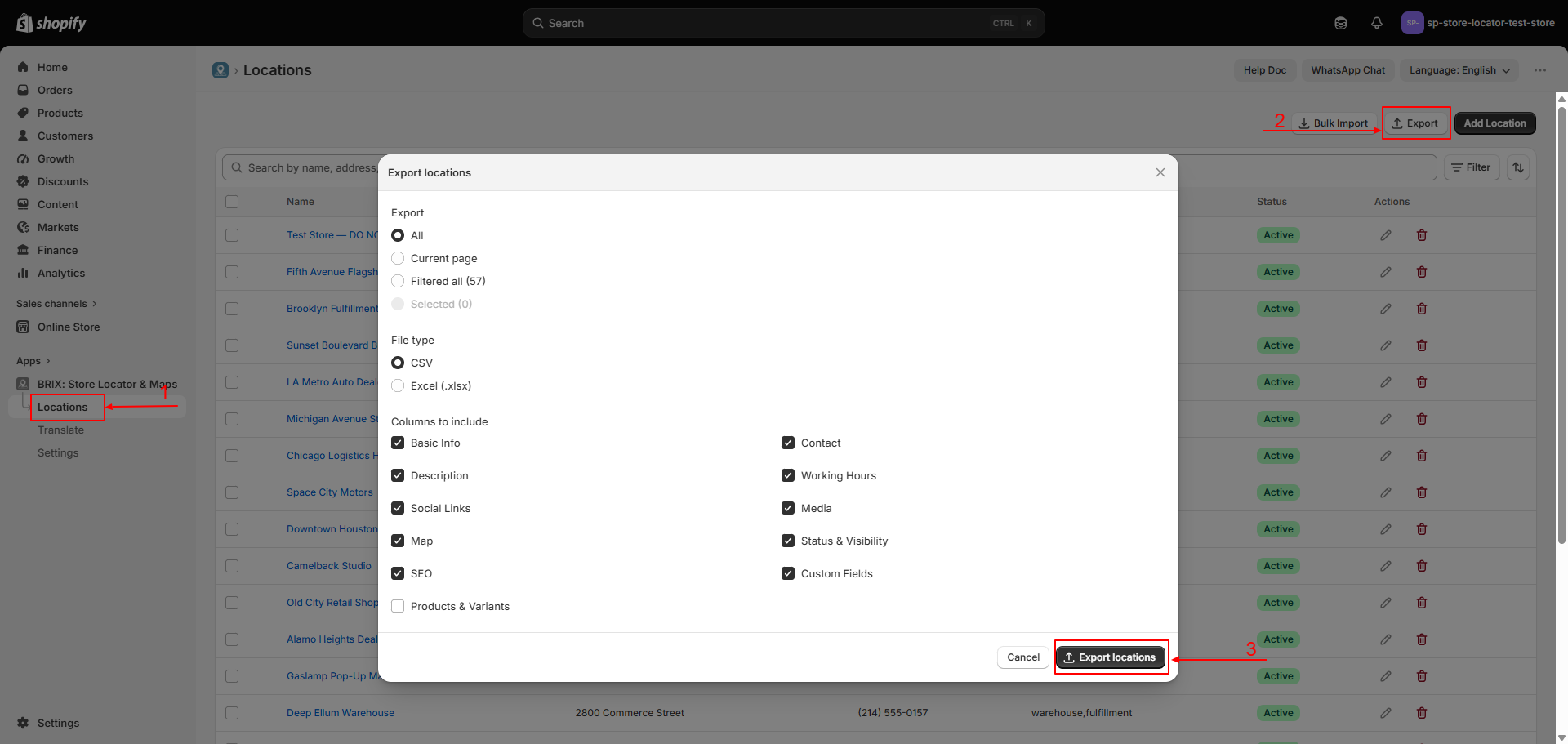
Apps → BRIX: Store Locator & Maps → Locations → Export
How to Use
- From Locations, optionally filter/search or select specific rows first.
- Click Export.
- Choose a scope: All, Current page, Filtered all (shows the count), or Selected (shows the count) - Filtered all and Selected are grayed out until you've actually filtered or selected something.
- Choose a file type: CSV or Excel (.xlsx).
- Choose which column groups to include (Basic Info, Contact, Description, Working Hours, Social Links, Media, Map, SEO, Status & Visibility, Custom Fields, and optionally Products & Variants).
- Click Export locations to download the file.
Available Settings
| Setting | Description |
|---|---|
| Scope | All / Current page / Filtered all / Selected |
| File type | CSV or Excel (.xlsx) |
| Column groups | Choose any combination of the field groups listed above |
| Products & Variants | Adds one row per linked product/variant per location, instead of one row per location |
Best Practices
- Export before a large CSV re-import so you have a clean backup to fall back on.
- Use the same column groups you plan to re-import, to keep the file's headers matching for Bulk Import via CSV.
Notes
- Selected/Filtered scope options are disabled when nothing is selected or filtered.
- Choosing Products & Variants changes the file's row structure - each location can span multiple rows, one per linked product/variant.
Troubleshooting
My export is missing a column I expected. Check that its column group is checked in the export dialog - unchecked groups are left out entirely.