

Appearance
Translations
Translate every customer-facing label, button, and message shown by your locator.
Overview
Translate lets you add any of your store's secondary languages and provide translated text for the locator's UI - search labels, filters, sort options, hours, and more - organized into five groups: General, Search & Filters, Location List, Location Card & Popup, and Store Hours (68 fields in total). Once saved, translated text is served directly to the live storefront based on the customer's language.
Benefits
- Cover nearly every piece of text the locator shows customers, not just a couple of labels
- Auto-translate a whole tab in one click, without overwriting anything you've already filled in by hand
- Pulls your store's actual configured languages from Shopify, so there's nothing extra to set up
Where to Find It
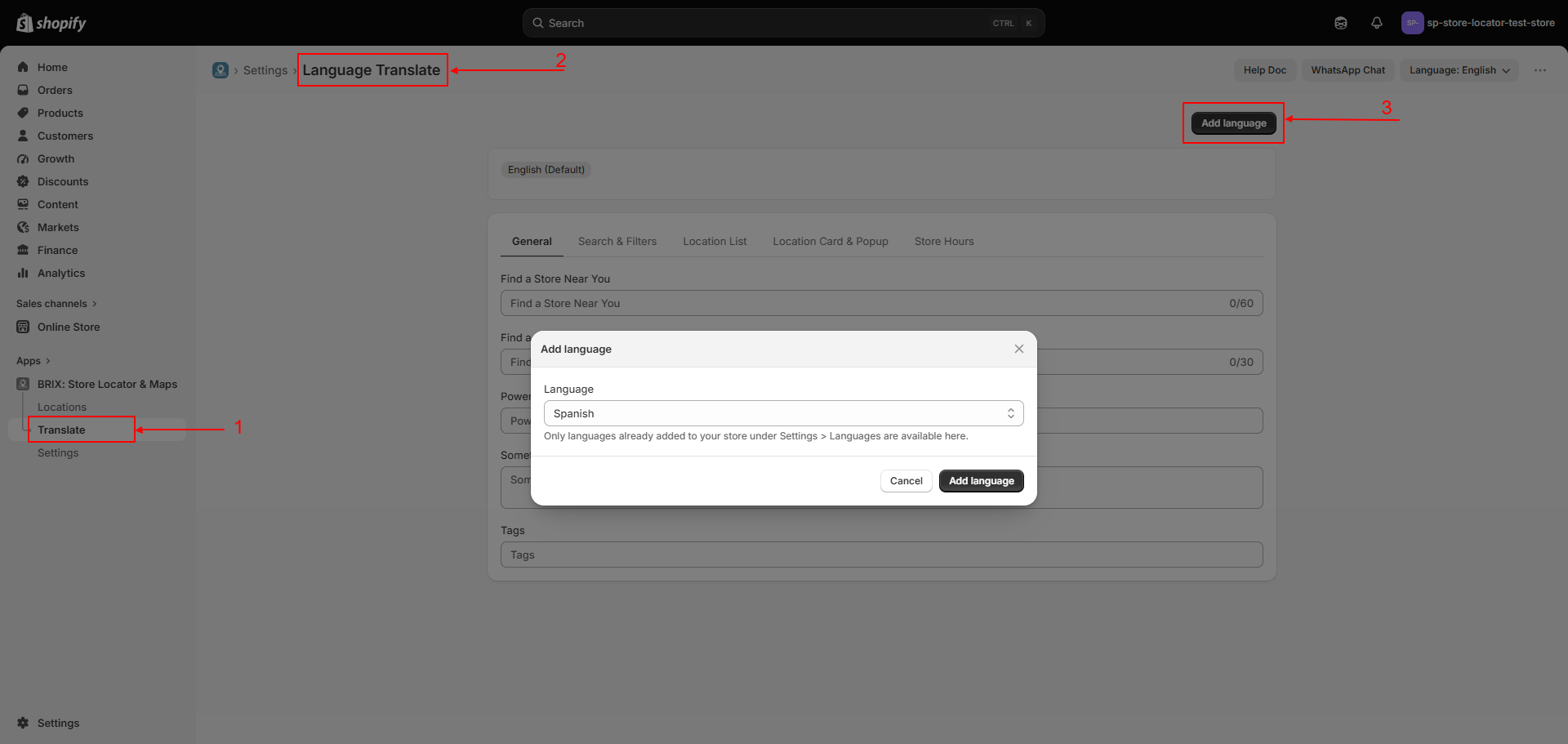
Apps → BRIX: Store Locator & Maps → Translate
How to Use
- Open Translate from the left navigation.
- Click Add language and choose one of your store's secondary languages (configured in Shopify's own language settings).
- Switch to the new language's tab, then work through the category sub-tabs: General, Search & Filters, Location List, Location Card & Popup, and Store Hours.
- Fill in a translation for any field, or click Auto-translate on a tab to machine-translate every empty field on that tab at once - fields you've already filled in are left untouched.
- Click Save. The app checks that any
{placeholder}tokens (like{time}or{distance}) are preserved in your translation before saving.
Available Settings
| Group | Covers |
|---|---|
| General | Hero heading, Find a Store button text, and other top-level labels (5 fields) |
| Search & Filters | Search placeholders, mode labels, radius label, locate button and its error messages, filter headings (23 fields) |
| Location List | Sort labels, empty/error states, Load More button, and other list text (17 fields) |
| Location Card & Popup | Directions, social labels, and other card/detail text (16 fields) |
| Store Hours | Day names and hours-related labels (7 fields) |
| Auto-translate | Machine-translates every empty field on the current tab in one click |
Best Practices
- Use Auto-translate as a starting point, then review and adjust anything that reads awkwardly - it's a free machine translation, not a professional review.
- Keep placeholder tokens like
{time}or{distance}intact when editing a translated string by hand - the app blocks saving a translation that drops one. - Add languages for the markets you actually serve rather than every language Shopify supports, to keep the tabs manageable.
Notes
- Only languages you've already configured as secondary languages in Shopify can be added here.
- Any field left blank for a language falls back to the base language's text, then to the built-in English default - customers never see an empty label.
Troubleshooting
A translation didn't save. Check for a missing {placeholder} token in your text - the app blocks the save and tells you which token is missing.
I don't see a language I want to add. Add it as a secondary language in Shopify's own language settings first, then it becomes available here.