

Appearance
Fixed Bundle
Sell a predefined set of products together at one fixed price.
Overview
Fixed Bundle lets you package several products together and sell them as one bundle, at a percentage or fixed-amount discount off the combined price. When you save a bundle, the app automatically creates a matching bundle product in your Shopify store for you. This page covers what's unique to this promotion type; see Product Promotions Overview for shared settings.
Benefits
- Package complementary products into one purchase without manually creating a bundle product yourself
- Offer a clear, fixed discount for buying the set versus buying items individually
- Give the bundle its own title and image, distinct from its individual component products
Where to Find It
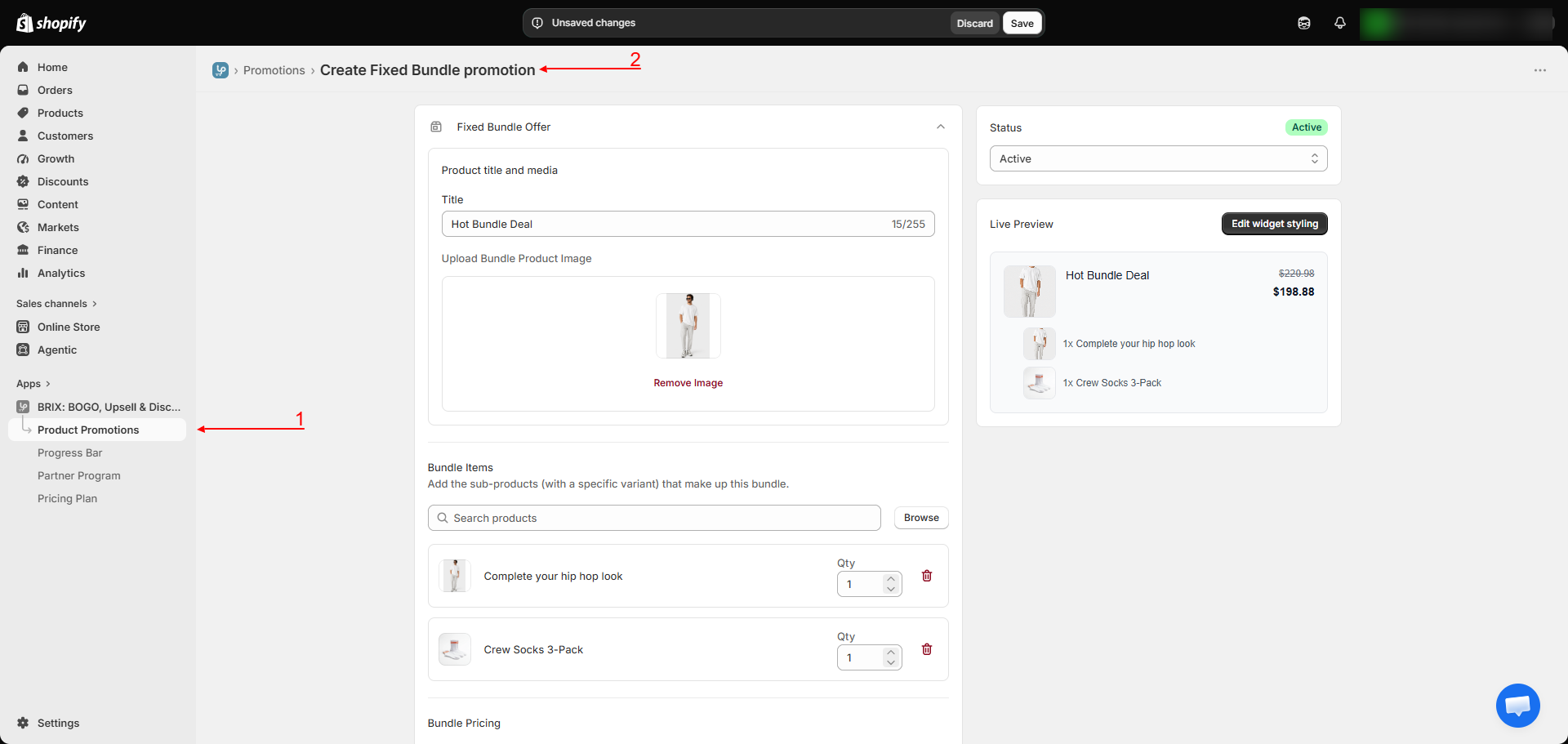
Apps → BRIX: BOGO, Upsell & Discount → Product Promotions → Create promotion → Fixed Bundle
How to Use
- From Create promotion, choose Fixed Bundle.
- Enter a Bundle Title and upload an image for the bundle (used as its product image).
- Add the Bundle Items: pick each product/variant to include and set the quantity of each.
- Choose your Bundle Pricing: Percentage off or Fixed amount off the combined price of the included items.
- Optionally turn on Free Shipping and Show label on collection page.
- Save. The app automatically creates a bundle product in your store using your title, image, and pricing.
- Add the Fixed Bundle Offer block to your product or collection template so customers can see and add the bundle.
Available Settings
| Setting | Description |
|---|---|
| Bundle Title | The name of the bundle product shown to customers |
| Bundle image | An image representing the bundle as a whole |
| Bundle Items | The products/variants included, with a quantity for each |
| Bundle Pricing | Percentage off or fixed amount off the combined item price |
| Free Shipping | Waives shipping on orders using this offer |
| Show label on collection page | Displays an offer badge on this product's card in collection/search listings (requires the Collection Offer Badges app embed) |
Note Because targeting is defined by the bundle's own item list, the general product/collection "applies to" step from Product Promotions Overview is skipped for this promotion type.
Best Practices
- Choose products that make sense together (a genuine "set"), since the bundle is sold and shown as a single item.
- Use a bundle image that clearly represents the set, since it's what customers see instead of the individual product photos.
- Keep the discount meaningful enough that buying the bundle is clearly better value than buying items separately.
Notes
- How orders can look: depending on how a customer's cart is assembled, an order may show either the individual component products or a single combined bundle line - this is expected and doesn't affect what the customer paid.
- Full cart-level bundling requires Shopify Plus or a development store. On other Shopify plans, the bundle offer and its pricing still work on the storefront, but the underlying cart-line restructuring behavior that unifies the bundle into a single order line may not apply - this is a Shopify platform requirement, not something this app can change.
- Splitting a bundle's line items into fully separate order fulfillment records is planned but not yet available.
Troubleshooting
The bundle isn't showing on my product page. Confirm the Fixed Bundle Offer block has been added to that template, and the promotion is Active.
My store isn't on Shopify Plus and the bundle's order lines don't look the way I expected. This is a known platform limitation - see the Notes section above. The bundle offer and pricing still work correctly for the customer regardless of plan.