

Appearance
Partner Program
Earn recurring commissions by referring other merchants to BRIX: BOGO, Upsell & Discount.
Overview
The Partner Program lets you refer other Shopify merchants to BRIX: BOGO, Upsell & Discount and earn a commission on their subscription, directly from your app dashboard.
Benefits
- Earn recurring commissions from merchants you refer
- Track referral clicks, installs, and revenue in one place
- Request a payout once you've built up a balance
Where to Find It
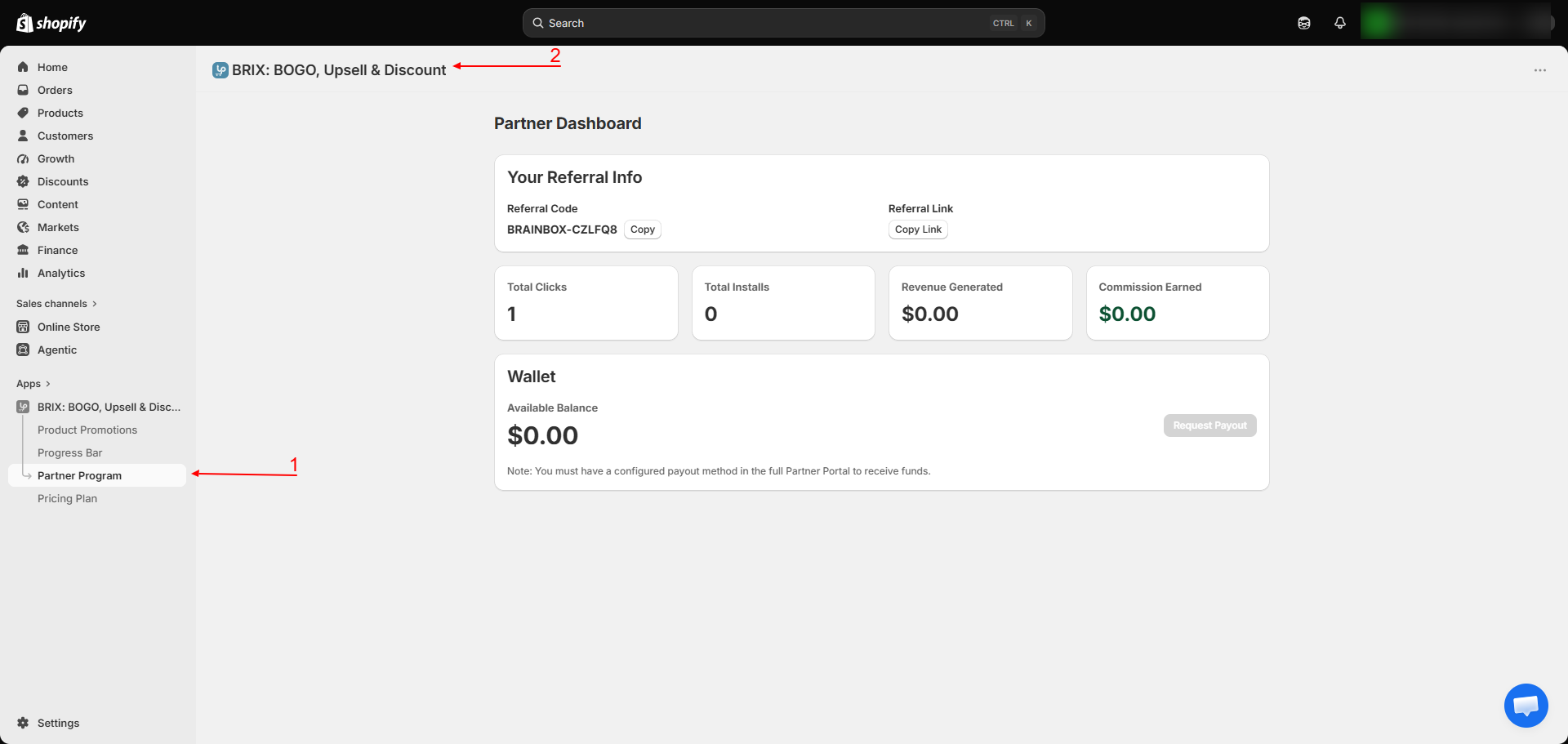
Apps → BRIX: BOGO, Upsell & Discount → Partner Program
How to Use
- Open the app and go to Partner Program.
- If you haven't joined yet, review the program benefits and click Become a Partner.
- Once enrolled, you'll see your Referral Code and Referral Link - share either with other merchants.
- Use the Copy buttons to quickly copy your code or link.
- Track your Total Clicks, Total Installs, Revenue Generated, and Commission Earned on your dashboard.
- Once your Available Balance is above zero, use Request Payout to withdraw your earnings.
Available Settings
This is a referral dashboard rather than a settings screen. It shows:
| Section | What It Shows |
|---|---|
| Referral Code / Link | Your unique code and shareable link for referring other merchants |
| Total Clicks | How many times your referral link has been clicked |
| Total Installs | How many merchants installed the app through your referral |
| Revenue Generated | Total revenue generated by merchants you referred |
| Commission Earned | Your total commission from those referrals |
| Wallet - Available Balance | Your current payout-eligible balance |
| Request Payout | Requests a withdrawal of your available balance |
Note You need a configured payout method to actually receive funds. If you haven't set one up, you may need to complete that step before a payout request can be fulfilled.
Best Practices
- Share your referral link with merchants who are a genuine fit for the app (running promotions, BOGO offers, or bundles) rather than broadly, since conversion quality matters more than raw clicks.
- Check your dashboard periodically rather than only when requesting a payout, so you can see which referral efforts are working.
Notes
- The Partner Program is a separate system from your own app subscription and billing - see Billing & Plans for your own pricing.
- The program may occasionally be temporarily unavailable; if so, the page will let you know rather than show partial or incorrect data.
Troubleshooting
The Partner Program page says the program is unavailable. This means the program is temporarily disabled. Check back later, or contact support if it persists.
I don't see a payout option even though I have a balance. You likely need to set up a payout method first - contact support for help completing this step.