

Appearance
Progress Bar Rewards & Milestones
Configure what customers unlock at each stage of the Cart Progress Bar, and how it's presented.
Overview
Each Cart Progress Bar can have multiple milestones. A milestone is a goal (a cart amount or item quantity) paired with a reward. As a customer's cart crosses each goal, that milestone's reward becomes available. See Cart Progress Bar for the general trigger and display settings this page builds on.
Benefits
- Layer multiple rewards into one bar (e.g. free shipping at $50, a free gift at $75)
- Choose the reward type that fits your margin and goals for each milestone
- Suggest products that help customers reach the next milestone
Where to Find It
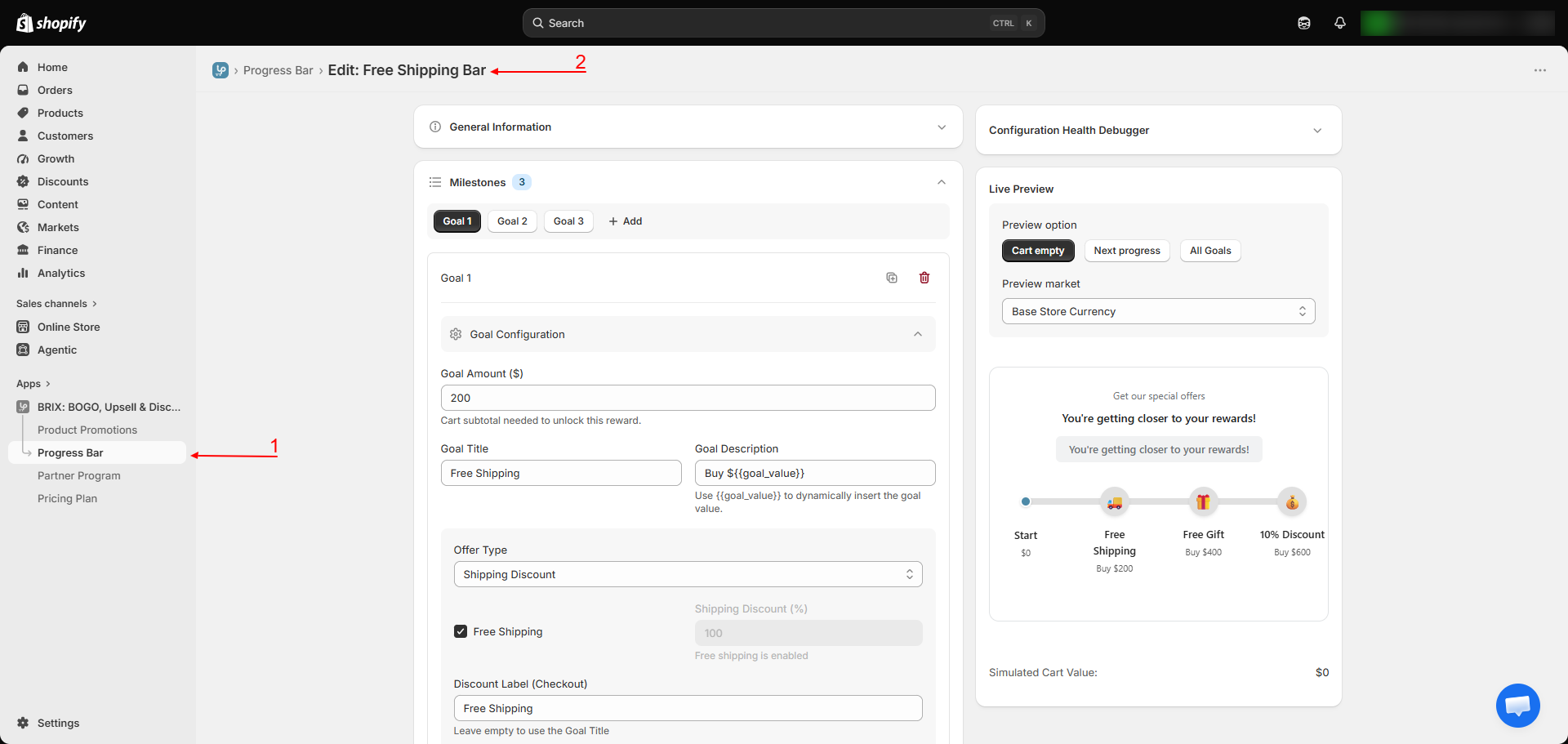
Apps → BRIX: BOGO, Upsell & Discount → Progress Bar → Create or edit a bar → Milestones
How to Use
- In a Progress Bar's editor, go to Milestones.
- Click Add milestone, then set its Goal Amount or Goal Quantity (matching the bar's trigger type), a Goal Title, and a Goal Description.
- Choose the Offer Type for this milestone:
- Shipping Discount - free shipping, or a percentage off shipping.
- % Discount on Total - a percentage off the order.
- Free Gift (Pick multiple) - customers can choose from a set of gift products you select, or you can mark it as a manually-fulfilled custom gift.
- For a Free Gift milestone, choose whether customers can pick a single gift, multiple gifts, or receive all eligible gifts by default, and set the maximum gifts allowed and maximum quantity per gift.
- Add an icon, a countdown message (shown before the milestone is reached), and a success message (shown once it is).
- Repeat for additional milestones, then configure the Display & Design section (colors, animation) and, optionally, Recommended Products to suggest items that help reach the next goal.
- If you sell in multiple currencies via Shopify Markets, review Market Goal Rules to set how each milestone's goal converts per market.
- Save.
Available Settings
Per milestone
| Setting | Description |
|---|---|
| Goal Amount / Goal Quantity | The cart value or item count required to unlock this milestone |
| Goal Title / Description | Customer-facing copy for this milestone |
| Offer Type | Shipping Discount, % Discount on Total, or Free Gift |
| Free Gift settings | Manual (merchant-fulfilled) or automatic gift selection, with single/multiple/all pick modes, and limits on gifts allowed and quantity per gift |
| Icon | A visual marker for this milestone on the bar |
| Countdown / Success messages | Shown before and after the milestone is reached, respectively |
Shopify Markets
| Setting | Description |
|---|---|
| Market Goal Rules | Only shown if your store uses Shopify Markets. Choose Auto (converts using the live exchange rate), Same as base goal, or Set exact amounts per market and milestone |
Recommended Products
| Setting | Description |
|---|---|
| Enable recommendations | Turns on a "what to add next" prompt |
| Goal Action | No action, open a recommendations popup, or redirect to a URL |
| Recommendation Source | Related products, best sellers, specific products, or specific collections |
| Max products to show | Limits the number of suggested products |
Popup appearance (shared by the gift picker and recommendations popup)
| Setting | Description |
|---|---|
| Variant display style | Pills, dropdown, swatches, or hidden |
| Products per row | Separate settings for desktop and mobile |
| Display options | Show description, price, vendor; allow quantity selection |
| Popup animation | Scale, slide up, or fade |
| Popup colors & layout | Background/button colors, border radius, overlay opacity |
Best Practices
- Use the live preview panel's simulator to check how the bar looks with an empty cart, mid-progress, and with every milestone reached, before you publish.
- Order your milestones from lowest to highest goal so the progress bar reads naturally as the cart grows.
- Keep free-gift pools small (a handful of relevant products) so the choice feels curated rather than overwhelming.
- If you sell internationally via Shopify Markets, review the Auto currency conversion before launch to confirm goal amounts feel right in each market's currency.
Notes
- The price of a free gift a customer could still add does not count toward the cart's progress or discount thresholds - only paid items count toward the goal.
- Multiple milestones can be unlocked and stacked at once as a customer's cart grows past several goals.
- A milestone marked as a manual/custom gift is not automatically added to the cart - you're expected to fulfill it yourself as part of order processing.
Troubleshooting
A milestone's reward isn't applying even though the goal looks reached. Double-check whether the bar is set to measure the goal before or after discounts (see Cart Progress Bar) - this can shift exactly when a milestone counts as reached.
The free gift popup isn't appearing. Confirm the milestone's Offer Type is set to Free Gift with automatic (not manual/custom) selection, and that at least one gift product is configured.
Currency-converted goals look wrong in one of my markets. Review the Market Goal Rules for that milestone - Auto uses a live exchange rate, so goals will fluctuate slightly with currency movement; use Set exact amounts if you want fixed, predictable goals per market.